
Play · Developers and platform teams
Ship a Claude agent to the team
Two commands put a Claude agentin front of your whole team.
A claude_agent_sdk agent on Waxell is a manifest: a system prompt, the built-in tools it may use, a signal, a turn cap and a dollar cap. Push it and it runs on the governed isolation-runner at a URL your teammates can open, with every tool call policy-checked and every run traced.
30 minutes. No commitment.
SOC 2 Type II attested · ISO/IEC 27001:2022 certified · HIPAA with a BAA · aligned to the EU AI Act and NIST AI RMF

Who
An engineer with a Claude agent that works on their laptop: a system prompt, a few tools, maybe a .claude/agents/*.md.
What happened
Three teammates asked for it. Sharing the folder meant three copies, three API keys, and no record of what any of them ran.
What's at stake
An agent that only runs where it was written, with no governance, no shared traces, and no way to run it as a specific end user with their own keys.
- 01Run
Scaffold the manifest. Paste the prompt in.
wax config init --profile acme points the CLI at your workspace, and wax whoami prints the workspace, its slug and its Tenant ID so you know where the push will land. wax init writes waxell.yaml and a short README: set framework: claude_agent_sdk and model: anthropic:claude-sonnet-4-6, list only the Claude Code built-ins the agent needs, paste your system prompt in, and declare a signal with the schema of its input. max_turns and max_budget_usd are the reason this runs in a runtime and not on a VM: when a run or anything it spawns would exceed them, the runtime stops dispatching mid-run and keeps the trace of what it was doing.
wax config init --profile acme · wax whoami · wax init · framework: claude_agent_sdk · tools: [Read, Glob, Grep, WebFetch] · max_turns: 12 · max_budget_usd: 4.0
terminal · waxell.yaml$ wax config init --profile acme$ wax whoami$ wax init# waxell.yamlagents: - name: research_agent framework: claude_agent_sdk model: anthropic:claude-sonnet-4-6 tools: [Read, Glob, Grep, WebFetch] system_prompt_file: prompt.md signals: - name: research source_type: api max_turns: 12 max_budget_usd: 2.0 - 02Run
Push it. It is live at a URL.
wax push --dry-run validates the manifest; wax push publishes the agent to your workspace, and wax agents info confirms it. The agent lives at https://<your-tenant>.waxell.dev/runtime/agents/<name>, where the team sees its spec, bindings, traces, cost and governance. Every tool call passes through policy checks before it executes, and the run's Setup span shows exactly what the agent was provisioned with: allowed tools, domains, identity. Bump version: on every re-push; re-pushing the same version with changed content fails with semver_conflict.
wax push --dry-run · wax push · wax agents info release_notes · /runtime/agents/<name> · bump version: or semver_conflict
runtime · deployed agents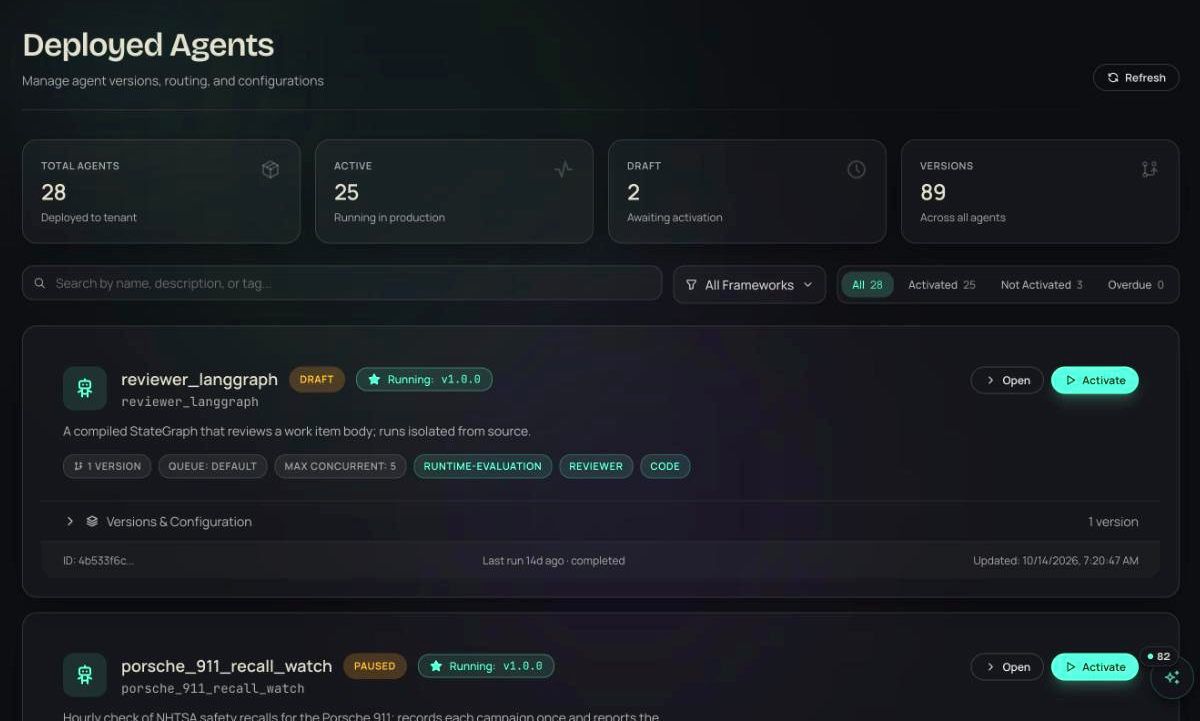
- 03Observe
Fire a signal. Read the trace.
wax signals fire run --payload '{"prompt": "..."}' --wait fires the signal and polls until the run finishes; --stream prints LLM calls, tool calls and progress messages as they land. The response shows status: matched, the run_id and the agent that picked it up, and the caller never waits for the agent, so the same POST to /api/v1/signals/run/ from your own backend returns immediately. wax runs list and wax runs show <run_id> --spans give the summary, the LLM calls, inputs, result and the full span tree; the agent's Run, Telemetry, Bindings and Versions tabs show the same in the app.
wax signals fire run --wait · --stream · status: matched · POST /api/v1/signals/run/ · wax runs show <run_id> --spans
observe · run trace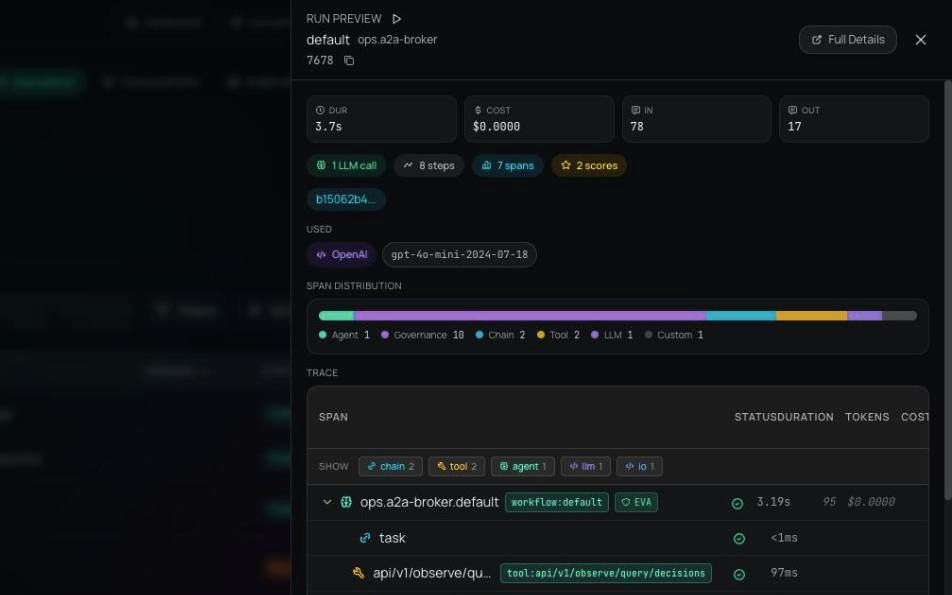
- 04Run
Run it as a teammate, on their keys.
wax end-users create maps your app's user id to a Waxell sub-user, and wax end-users set-secret stores that person's own Anthropic key or tool token: write-only and encrypted at rest, so you can set or rotate it but never read it back, and list-secrets shows keys only. Your backend stamps a signed _sub_user_identity on the signal with both sub_user_id and user_id, and the run reasons on that person's key and calls tools with their tokens, resolved host-side so the model never sees a raw secret. Resolution runs SubUser, then Tool, then Agent, then Tenant: a user's own credential overrides every shared default, and one user can never resolve another's.
wax end-users create --tenant-sub-user-id alice · set-secret (write-only) · list-secrets (keys only) · _sub_user_identity · SubUser, Tool, Agent, Tenant
terminal · end users$ wax end-users create --tenant-sub-user-id alice --email alice@acme.com$ wax end-users set-secret alice ANTHROPIC_API_KEY sk-ant-...$ wax end-users set-secret alice GITHUB_TOKEN ghp_... --agent research_agent$ wax end-users list-secrets alice# keys only. A secret can be set or rotated, never read back.# resolution order for every credentialSubUser → Tool → Agent → Tenant

- provisioned · Read, Glob, Grep, WebFetch · anthropic:claude-sonnet-4-6release_notes · run 4471 · setup · max_turns 12 · max_budget_usd 4.0allow
- WebFetch · changelog v2.1release_notes · run 4471 · turn 3 · policy check before execution · in the tools listallow
- anthropic.messagesrelease_notes · run 4478 · turn 9 · max_budget_usd 4.0 reached · dispatch stopped · trace keptblock
- anthropic.messages · ANTHROPIC_API_KEYrelease_notes · run 4490 · for alice · Alice's own key · resolved host-sideallow
Illustrative entries in the shape the product writes them.
No. wax init writes the manifest and you paste your system prompt in; the Claude Agent SDK drives the loop inside its container. If you use Claude Code, wax claude-init installs a skill so Claude can drive the whole tutorial when you say 'deploy this agent to Waxell'.
Run this play this week.
Free for your first agents and devices, live in about thirty seconds. Or walk through it with someone who has run it before.
30 minutes. No commitment.
SOC 2 Type II attested · ISO/IEC 27001:2022 certified · HIPAA with a BAA · aligned to the EU AI Act and NIST AI RMF