
Play · Developers and platform teams
Operate a fleet of agents on a schedule
Day two starts when the agentis deployed.
A schedule fires the agent through the same dispatch path as an API signal, so policies, quotas and runtime settings all apply. Watch any run live, get alerted after consecutive failures, and change a timeout during an incident without a redeploy.
30 minutes. No commitment.
SOC 2 Type II attested · ISO/IEC 27001:2022 certified · HIPAA with a BAA · aligned to the EU AI Act and NIST AI RMF

Who
A platform team with nine agents on daily and weekly cadences: digests, reconciliations, a Friday wrap-up.
What happened
A digest agent failed quietly for four nights. The first anyone knew was a Monday message asking where the report was.
What's at stake
Schedules living on three cron hosts, no way to watch a run as it happens, an incident fix the next deploy overwrites, and agents that forget everything between runs.
- 01Run
Schedule it in the manifest, or from the CLI so it survives pushes.
Add schedule: "0 9 * * *" to the agent in waxell.yaml, or the expanded form with a cron, a signal declared on the agent, a payload and a named slot, as many entries as you need. Cron expressions are five-field and evaluate in UTC at minute resolution. A scheduled fire goes through the same dispatch path as an API signal fire, so governance policies, plan quotas and runtime settings all apply; if the schedule names a signal, that signal fires exactly as if you had called the webhook. Missed windows are skipped, never backfilled: a brief outage across a */5 schedule gives you one catch-up run, not a burst. wax agents schedule shows the schedules and the next fire, and --set, --pause, --resume and --delete manage them; a schedule set from the CLI or the UI is operator-owned and survives future pushes, while one declared in waxell.yaml re-syncs on every push.
schedule: "0 9 * * *" · cron / signal / payload / slot · UTC, minute resolution · wax agents schedule my-agent --set "*/30 * * * *" · --pause · --resume
runtime · deployed agents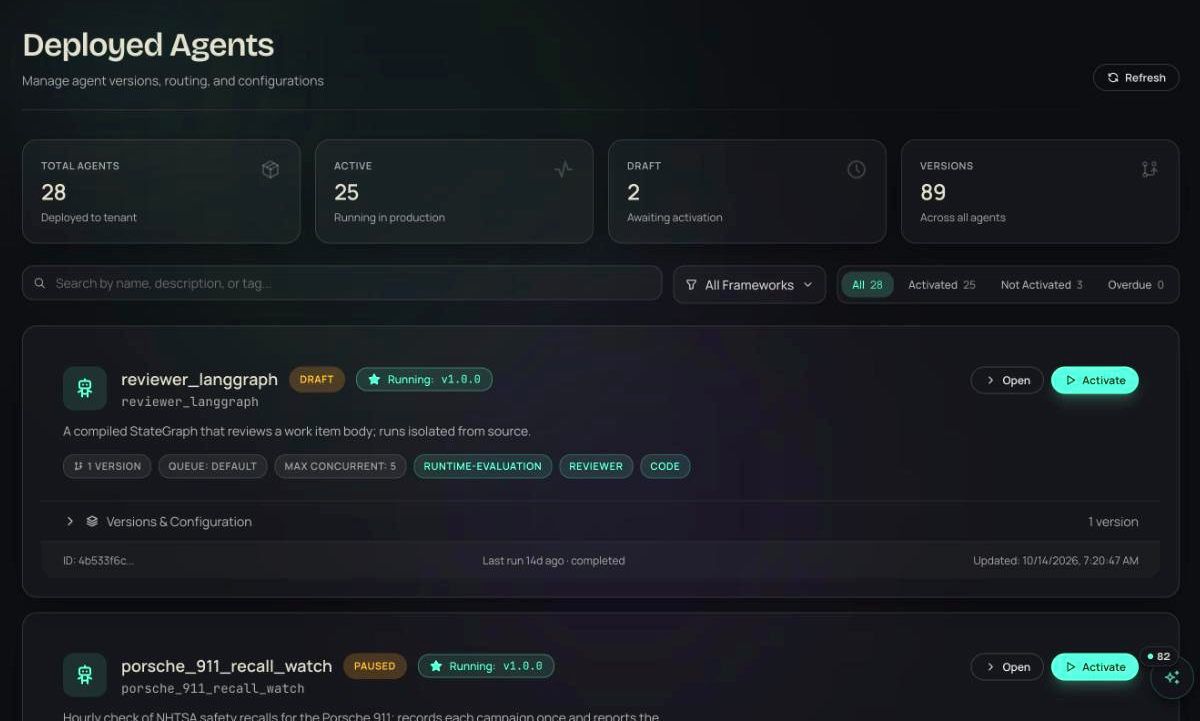
- 02Observe
Watch it live. Read the record after.
wax runs tail <run-id> streams the run's event timeline, tool calls, LLM calls and agent messages as each completes, then prints the final result; it works on any run, fired, scheduled or started from the UI, and wax signals fire --stream follows a fresh fire the same way. Every run leaves the same record whatever started it: the span tree, an LlmCallRecord per model call, the policy decisions, any ExecutionIncident, usage events and the audit log entry saying what triggered it.
wax runs tail <run-id> · wax signals fire --stream · span tree · LlmCallRecord · ExecutionIncident
observe · executions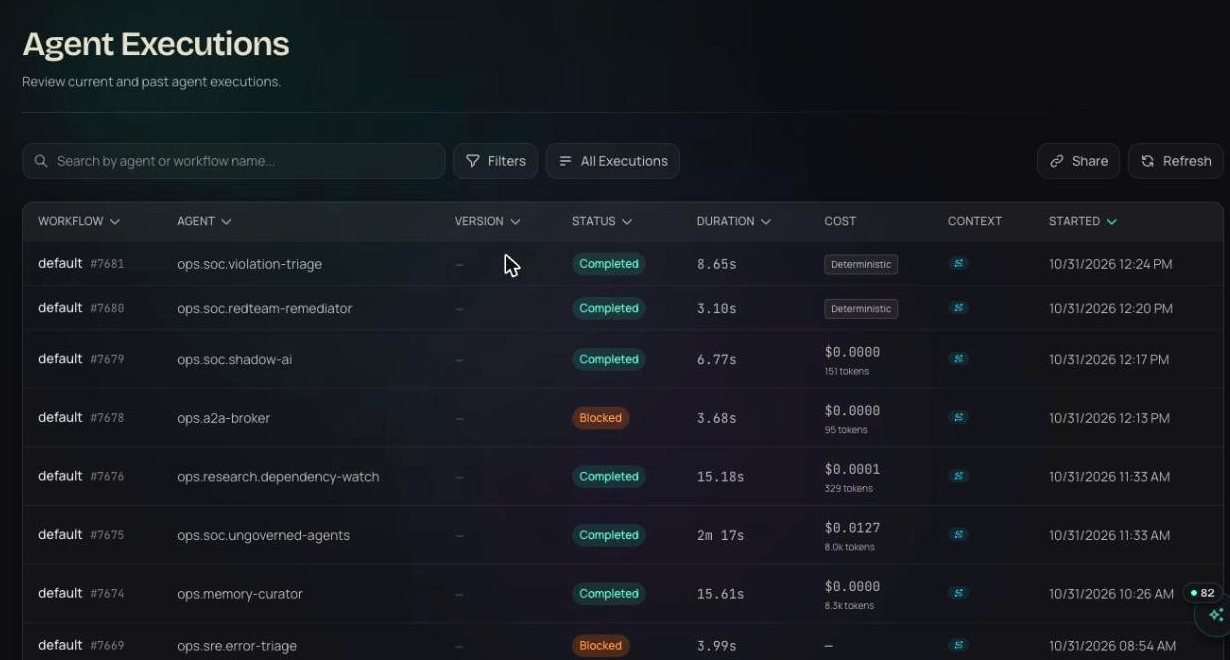
- 03Run
An email after three failures. A timeout bump that survives the deploy.
On the agent's Overview, Alert me on failures sends an email after 3 consecutive failed runs, one notification per cooldown window so a bad night does not flood your inbox. For finer control, rules under Settings, Alerts cover error-rate thresholds, cost thresholds, p95 latency, score thresholds and run-failure rules with a configurable consecutive-failure count, each delivered to email, Slack or a webhook and scoped to one agent or the whole fleet. The Runtime settings section on the same Overview shows the values declared in waxell.yaml, and an operator can override the timeout, the execution mode (shared or isolated), the tier hint and the sensitivity in place; overrides win over the manifest and survive pushes until cleared, so an incident-time timeout bump cannot be wiped by the next deploy, and the section shows when an override is active and who set it.
Alert me on failures · 3 consecutive · error rate, cost, p95 latency, score, run failures · email, Slack, webhook · override survives pushes until cleared · who set it
- 04Prove
Memory with provenance. Compute you can export.
Agents built on the native runtime with @agent, @workflow and ctx.domain declare memory slots by tier: working is a per-run Redis scratchpad that expires after an hour and captures every domain result under a handle like $ref:market_data_fetch_prices.1, so the bytes move tool to tool without passing through the model's conversation; session holds conversation or plan state for 24 hours by default; episodic keeps cross-run state in Postgres on a TTL; semantic stores long-term facts in pgvector with vector search. Every scope key starts with tenant_id whether or not you list it. The graph tier is the one other agents read, so it carries grants and provenance: graph_access is read, write or read_write, enforced when the tools are built and again at the backend, and every node records the agent that wrote it, the run, the person it acted for and the tool; wax graph provenance prints that trail for any key. Every runtime run meters CPU-seconds and memory-GB-hours, totaled per agent, per day and per disposition under Analyze, Compute, exportable as CSV, with wax billing usage for the plan quota position.
working · session · episodic · semantic · graph · $ref:<tool>.<n> · graph_access: read / write / read_write · wax graph provenance things thing-001 · wax billing usage
memory tiers · provenance# memory tiers an agent can declareworking: per run, Redis, expires after 1 hoursession: conversation or plan state, 24 hoursepisodic: cross-run state in Postgres, on a TTLsemantic: long-term facts, pgvector searchgraph: shared with other agents, with grantsgraph_access: read | write | read_write$ wax graph provenance things thing-001# who wrote it, in which run, for whom, with which tool$ wax billing usage

- scheduled fire · build_digest · 09:00 UTCdaily_digest_agent · slot morning · same dispatch path as a signal · policies and quotas appliedallow
- run failed · 3rd consecutivedaily_digest_agent · run 6102 · Alert me on failures · email sent · one per cooldown windowblock
- override timeout 300 s to 900 sj.park · daily_digest_agent · Overview · wins over the manifest · survives pushes until clearedallow
- graph.remember_batch · +2 entities, +1 relationships · thingsreviewer_claude · run 6131 · for u_42 · graph_access read_write · provenance: run 6131, u_42allow
Illustrative entries in the shape the product writes them.
It is skipped, never backfilled. If the platform is briefly unavailable across a */5 schedule you get one catch-up run.
Run this play this week.
Free for your first agents and devices, live in about thirty seconds. Or walk through it with someone who has run it before.
30 minutes. No commitment.
SOC 2 Type II attested · ISO/IEC 27001:2022 certified · HIPAA with a BAA · aligned to the EU AI Act and NIST AI RMF