MCP Gateway

One URL. Every MCP tool call your agents make — governed.
One URL. Every MCP tool call your agents make — governed.
Waxell MCP Gateway is the governance layer for AI agent tool use. Every tools/call — to GitHub, Slack, Notion, your internal APIs, or anything else — flows through identity resolution, policy enforcement, fingerprinting, and audit before it reaches any upstream. Your agents keep working. You finally know what they're doing.
{
  "mcpServers": {
    "waxell": {
      "url": "https://mcp-gateway.<tenant>.waxell.dev/mcp/"
    }
  }
}
Works with Claude Desktop, Claude Code, Cursor, and any MCP-compatible client. One URL replaces every upstream MCP config on every machine.
{
  "mcpServers": {
    "waxell": {
      "url": "https://mcp-gateway.<tenant>.waxell.dev/mcp/"
    }
  }
}
Works with Claude Desktop, Claude Code, Cursor, and any MCP-compatible client. One URL replaces every upstream MCP config on every machine.
Free to start. 2-line setup.

SOC 2 Ready
{
  "mcpServers": {
    "waxell": {
      "url": "https://mcp-gateway.<tenant>.waxell.dev/mcp/"
    }
  }
}
Works with Claude Desktop, Claude Code, Cursor, and any MCP-compatible client. One URL replaces every upstream MCP config on every machine.
Free to start. 2-line setup.
SOC 2 Ready
THE PROBLEM
Every company running AI agents is running an N×M problem: N agent clients — Claude Code, Claude Desktop, Cursor, custom agents — connected to M MCP servers. Each connection authenticated separately. Every credential stored separately. Every tool call invisible to the security team.
✕ No central list of which MCP servers your team has connected
✕ Tool calls attributed to a bot account, not the person who triggered them
✕ No preventive control — governance happens after the fact, if at all
✕ Offboarding requires chasing credentials across 5–15 SaaS admin consoles
✕ No SOC 2 evidence — "show me every tool call last quarter" has no answer
✕ MCP server updates can change tool behavior overnight — with no alert
THE ALTERNATIVE
The web got API gateways. Traffic got web application firewalls. Identity got identity-aware proxies. The shift in each case was the same: as integrations scaled faster than per-integration governance could keep up, the industry built a chokepoint.
MCP is scaling the same way. Waxell MCP Gateway is the chokepoint.
THE PROBLEM
Every company running AI agents is running an N×M problem: N agent clients — Claude Code, Claude Desktop, Cursor, custom agents — connected to M MCP servers. Each connection authenticated separately. Every credential stored separately. Every tool call invisible to the security team.
✕ No central list of which MCP servers your team has connected
✕ Tool calls attributed to a bot account, not the person who triggered them
✕ No preventive control — governance happens after the fact, if at all
✕ Offboarding requires chasing credentials across 5–15 SaaS admin consoles
✕ No SOC 2 evidence — "show me every tool call last quarter" has no answer
✕ MCP server updates can change tool behavior overnight — with no alert
THE ALTERNATIVE
The web got API gateways. Traffic got web application firewalls. Identity got identity-aware proxies. The shift in each case was the same: as integrations scaled faster than per-integration governance could keep up, the industry built a chokepoint.
MCP is scaling the same way. Waxell MCP Gateway is the chokepoint.
What Waxell MCP Gateway Is
One MCP endpoint per tenant. You point your agents at it. Behind it, the gateway brokers to every upstream MCP server your team has configured — GitHub, Slack, Notion, Linear, internal APIs, stdio subprocesses. Every tools/call is identity-resolved, policy-checked, fingerprinted, and logged before the upstream sees it. And every result is checked again on the way back.
Your agents see one URL. Your security team sees everything.

Fingerprints:
The Rug Pull Answer
The most common MCP security failure isn't a hack. It's drift: a tool description that changes after you trusted it, adding instructions your agent now follows. A new tool that appears on a connected upstream and gets called before anyone reviews it.
The Fingerprints tab tracks every tool the gateway has seen across all connected upstreams, hashed against its name, description, and input schema. Any change triggers a status transition.
A trusted tool that drifts goes back to Drift Detected — it doesn't stay trusted. The gateway catches it at the next discovery refresh before any agent calls the updated version.
And separately: the prompt injection scanner.
Every tool description is scanned for embedded instructions at fingerprint time — before any user or agent ever calls the tool. If a tool description contains content that could manipulate agent behavior (the standard tool poisoning vector), it surfaces in the Risks tab as a finding with a severity rating. When a tool drifts and its description changes, the scanner runs again on the new description.
This is the only surface in any MCP governance product that scans tool descriptions for prompt injection at rest, not at call time.
| Status | What it means |
|---|---|
| Pending review | Newly discovered tool — cannot be called until an admin approves it |
| Drift detected | A trusted tool changed its schema or description — resurfaces for admin review |
| Trusted | Admin has reviewed and approved this tool at its current definition |
| Blocked | Admin has explicitly blocked this tool — it cannot be called through the gateway |
| Removed | Previously advertised tool, now absent from the upstream's tool list |
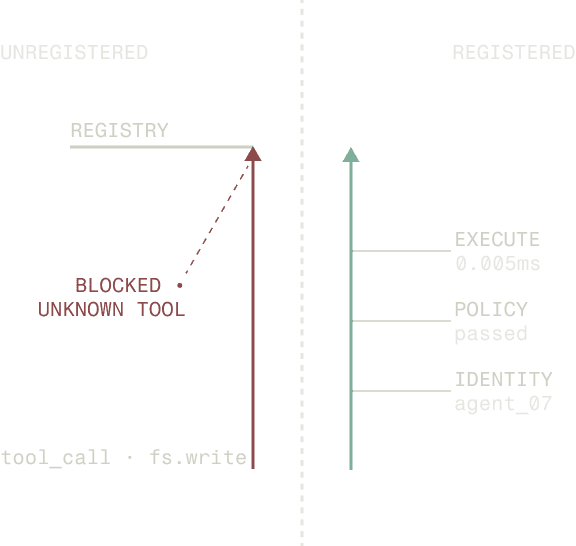
Policy Gate
Every tools/call is evaluated against your tenant's policy rules before the upstream sees it and again before the result returns to the agent. Rule changes propagate to the fleet within 30 seconds — no restart, no redeploy.
One mechanic worth calling out: when a call requires approval and gets parked for review, the gateway holds the MCP connection open with progress notifications so the agent doesn't time out. When a reviewer approves, the call resumes upstream and the result returns normally. When they deny, the agent gets a structured error it can recover from. The approval pauses the agent — it doesn't break it.
Identity & Offboarding
Every tool call through the gateway is resolved to a real user identity — not a service account. When a call reaches GitHub, Slack, or Notion, the upstream's audit log shows the person who triggered it.
Three auth modes are available per upstream:
On-behalf-of OAuth — the gateway brokers the OAuth flow, stores the user's refresh token (KMS-encrypted, never returned to the agent client), and mints a fresh access token at call time. The upstream sees the actual user. Required for write-heavy or regulated upstreams.
Shared service account — the tenant configures one account at the org level. Gateway uses it for everyone. Fast to deploy; upstream attribution is the service account. Acceptable for low-risk reads.
Bring-your-own token — for upstreams without a standard OAuth flow. Token is stored in the credential broker, never logged, never returned to the client.
When an employee leaves, deactivating their Waxell account revokes every per-upstream OAuth grant they held — in one transaction, across every upstream simultaneously. No per-tool chase. The audit log records the revocation event, the timestamp, the actor, and the list of upstreams unwound. The compliance artifact exists immediately.

Audit
Every tools/call the gateway brokered — with the resolved identity, the decision, and the rules that fired — is stored in the Audit log. Durable for years. Exportable to CSV. No payloads stored.
That last point matters: the audit log records what happened (who called what tool, what decision applied, which rules fired, when) without retaining the argument values or result bodies that passed through. Sensitive content is handled by the redaction pipeline. The compliance artifact proves what happened without holding the data that did.
For the audit question that ends conversations with compliance teams — "show me every tool call every employee's agent made last quarter" — this is the answer.
1
URL per tenant
5
fingerprint states
4
decision types
30s
policy propagation
Need to keep tool calls inside your network?
The same gateway image that runs in Waxell's managed multi-tenant deployment also runs single-tenant inside your VPC. One artifact, different config. Policy decisions, credential storage, and audit data stay inside your network. Only signed health summaries flow back to Waxell — and those can be turned off.
The self-hosted version is not a separate fork. It ships at the same release cadence as the managed deployment.
What Waxell MCP Gateway Is
One MCP endpoint per tenant. You point your agents at it. Behind it, the gateway brokers to every upstream MCP server your team has configured — GitHub, Slack, Notion, Linear, internal APIs, stdio subprocesses. Every tools/call is identity-resolved, policy-checked, fingerprinted, and logged before the upstream sees it. And every result is checked again on the way back.
Your agents see one URL. Your security team sees everything.
How to Get Started
01
Install and initialize
pip install waxell-observe
and initialize before your imports. Waxell is framework-agnostic — works with LangChain, CrewAI, LlamaIndex, and custom Python agents. No changes to existing agent logic required.
02
Registry is derived automatically
Waxell registers your agents, workflows, and tools from live code. The Code Reality DAG is generated automatically and stays current. No diagrams to draw or maintain.
03
Enforcement and observability begin
Policy enforcement, observability, and audit records all operate against the registered definitions. Drift surfaces before production. Every execution traces back to a known, versioned component.
01
Install and initialize
pip install waxell-observe
and initialize before your imports. Waxell is framework-agnostic — works with LangChain, CrewAI, LlamaIndex, and custom Python agents. No changes to existing agent logic required.
02
Registry is derived automatically
Waxell registers your agents, workflows, and tools from live code. The Code Reality DAG is generated automatically and stays current. No diagrams to draw or maintain.
03
Enforcement and observability begin
Policy enforcement, observability, and audit records all operate against the registered definitions. Drift surfaces before production. Every execution traces back to a known, versioned component.
Fingerprints:
The Rug Pull Answer
The most common MCP security failure isn't a hack. It's drift: a tool description that changes after you trusted it, adding instructions your agent now follows. A new tool that appears on a connected upstream and gets called before anyone reviews it.
The Fingerprints tab tracks every tool the gateway has seen across all connected upstreams, hashed against its name, description, and input schema. Any change triggers a status transition.
A trusted tool that drifts goes back to Drift Detected — it doesn't stay trusted. The gateway catches it at the next discovery refresh before any agent calls the updated version.
And separately: the prompt injection scanner.
Every tool description is scanned for embedded instructions at fingerprint time — before any user or agent ever calls the tool. If a tool description contains content that could manipulate agent behavior (the standard tool poisoning vector), it surfaces in the Risks tab as a finding with a severity rating. When a tool drifts and its description changes, the scanner runs again on the new description.
This is the only surface in any MCP governance product that scans tool descriptions for prompt injection at rest, not at call time.
Fingerprints:
The Rug Pull Answer
The most common MCP security failure isn't a hack. It's drift: a tool description that changes after you trusted it, adding instructions your agent now follows. A new tool that appears on a connected upstream and gets called before anyone reviews it.
The Fingerprints tab tracks every tool the gateway has seen across all connected upstreams, hashed against its name, description, and input schema. Any change triggers a status transition.
A trusted tool that drifts goes back to Drift Detected — it doesn't stay trusted. The gateway catches it at the next discovery refresh before any agent calls the updated version.
And separately: the prompt injection scanner.
Every tool description is scanned for embedded instructions at fingerprint time — before any user or agent ever calls the tool. If a tool description contains content that could manipulate agent behavior (the standard tool poisoning vector), it surfaces in the Risks tab as a finding with a severity rating. When a tool drifts and its description changes, the scanner runs again on the new description.
This is the only surface in any MCP governance product that scans tool descriptions for prompt injection at rest, not at call time.
| Status | What it means |
|---|---|
| Pending review | Newly discovered tool — cannot be called until an admin approves it |
| Drift detected | A trusted tool changed its schema or description — resurfaces for admin review |
| Trusted | Admin has reviewed and approved this tool at its current definition |
| Blocked | Admin has explicitly blocked this tool — it cannot be called through the gateway |
| Removed | Previously advertised tool, now absent from the upstream's tool list |
Policy Gate
Every tools/call is evaluated against your tenant's policy rules before the upstream sees it and again before the result returns to the agent. Rule changes propagate to the fleet within 30 seconds — no restart, no redeploy.
One mechanic worth calling out: when a call requires approval and gets parked for review, the gateway holds the MCP connection open with progress notifications so the agent doesn't time out. When a reviewer approves, the call resumes upstream and the result returns normally. When they deny, the agent gets a structured error it can recover from. The approval pauses the agent — it doesn't break it.
Identity & Offboarding
Every tool call through the gateway is resolved to a real user identity — not a service account. When a call reaches GitHub, Slack, or Notion, the upstream's audit log shows the person who triggered it.
Three auth modes are available per upstream:
On-behalf-of OAuth — the gateway brokers the OAuth flow, stores the user's refresh token (KMS-encrypted, never returned to the agent client), and mints a fresh access token at call time. The upstream sees the actual user. Required for write-heavy or regulated upstreams.
Shared service account — the tenant configures one account at the org level. Gateway uses it for everyone. Fast to deploy; upstream attribution is the service account. Acceptable for low-risk reads.
Bring-your-own token — for upstreams without a standard OAuth flow. Token is stored in the credential broker, never logged, never returned to the client.
When an employee leaves, deactivating their Waxell account revokes every per-upstream OAuth grant they held — in one transaction, across every upstream simultaneously. No per-tool chase. The audit log records the revocation event, the timestamp, the actor, and the list of upstreams unwound. The compliance artifact exists immediately.
Audit
Every tools/call the gateway brokered — with the resolved identity, the decision, and the rules that fired — is stored in the Audit log. Durable for years. Exportable to CSV. No payloads stored.
That last point matters: the audit log records what happened (who called what tool, what decision applied, which rules fired, when) without retaining the argument values or result bodies that passed through. Sensitive content is handled by the redaction pipeline. The compliance artifact proves what happened without holding the data that did.
For the audit question that ends conversations with compliance teams — "show me every tool call every employee's agent made last quarter" — this is the answer.
1
URL per tenant
5
fingerprint states
4
decision types
30s
policy propagation
Need to keep tool calls inside your network?
The same gateway image that runs in Waxell's managed multi-tenant deployment also runs single-tenant inside your VPC. One artifact, different config. Policy decisions, credential storage, and audit data stay inside your network. Only signed health summaries flow back to Waxell — and those can be turned off.
The self-hosted version is not a separate fork. It ships at the same release cadence as the managed deployment.
How to Get Started
01
Add one URL to your agent config
Replace every upstream MCP server in your config with a single Waxell gateway URL. No API key in the config file — authentication is handled via OAuth at first connection. Works with Claude Desktop, Claude Code, Cursor, and any MCP-compatible client.
02
Connect your upstreams
Add GitHub, Slack, Notion, Linear, internal APIs, or any MCP-compatible upstream from the Catalog. Each upstream is immediately subject to policy and fingerprinting. Users connect their accounts once via OAuth — the gateway handles the rest.
Waxell registers your agents, workflows, and tools from live code. The Code Reality DAG is generated automatically and stays current. No diagrams to draw or maintain.
03
Fingerprinting, policy, and audit begin immediately
Every tool on every connected upstream is hashed at discovery. New tools require admin approval. Tool descriptions are scanned for prompt injection. Every tools/call is evaluated against your policy rules and logged with full attribution.
How to Get Started
01
Install and initialize
pip install waxell-observe
and initialize before your imports. Waxell is framework-agnostic — works with LangChain, CrewAI, LlamaIndex, and custom Python agents. No changes to existing agent logic required.
02
Registry is derived automatically
Waxell registers your agents, workflows, and tools from live code. The Code Reality DAG is generated automatically and stays current. No diagrams to draw or maintain.
03
Enforcement and observability begin
Policy enforcement, observability, and audit records all operate against the registered definitions. Drift surfaces before production. Every execution traces back to a known, versioned component.
POLICY A
POLICY B
POLICY C
POLICY D
Designed to scale
Centralized, reference-based policies scale cleanly across workflows, teams, and environments.
They are suitable for systems where execution is continuous, changes are expected, and governance must remain consistent over time.
Policies do not become harder to manage as automation expands. They become more important.
CallSine automatically finds and researches each prospect by analyzing their website, LinkedIn profile, and company information. Get comprehensive insights instantly without spending hours on manual research. It even works with your existing database.
Your agents are already calling tools.
The Waxell MCP Gateway gives you governance over which ones — and a record that proves you had it.
Free to start. 2-line setup.
SOC 2 Ready
FAQ
What is AI agent policy enforcement?
AI agent policy enforcement is the practice of applying predefined governance rules to autonomous agents at runtime — before or during execution — to ensure they operate within defined boundaries. Unlike observability, which records what agents did, enforcement prevents disallowed actions from completing. Waxell enforces policies deterministically across 26 categories, including cost limits, content filtering, kill switches, and PII protection.
How does Waxell enforce policies before execution begins?
When a workflow is triggered, Waxell evaluates all applicable policies against the current context before execution proceeds. Policies are stored centrally in the governance plane — not embedded in agent code — and applied by reference. If a policy condition is not met, execution stops and the outcome is logged with full context. There is no probabilistic reasoning, adaptive override, or silent exception.
What types of AI agent policies can Waxell enforce?
Waxell supports 26 policy categories covering the full surface area of agent behavior: cost and token limits, content and input scanning, PII protection, kill switches, rate limits, scheduling constraints, identity controls, data access restrictions, LLM-specific rules, human approval gates, and more. For teams with compliance requirements, Waxell Assurance covers how these policies map to audit, accountability, and operational trust.
Can Waxell policies be applied to existing agents without code changes?
Yes. Waxell instruments existing Python agents in two lines of code — install the SDK, initialize before your imports, and policy enforcement begins automatically. Waxell is framework-agnostic and works with LangChain, CrewAI, LlamaIndex, and custom Python agents. No changes to existing agent logic are required.
What happens when a Waxell policy blocks an agent execution?
When a policy condition is not met, execution halts and the event is recorded with full context — which policy applied, what condition failed, and the surrounding execution state. The record exists immediately and is inspectable without reconstructing from logs. Policy owners can review blocked executions, adjust rules, and retest using the same inputs and constraints that triggered the block.
Your agents are already calling tools.
The Waxell MCP Gateway gives you governance over which ones — and a record that proves you had it.
Free to start. 2-line setup.
FAQ
What is the Waxell MCP Gateway?
The Waxell MCP Gateway is a single MCP endpoint that sits between your AI agents and the tools they call. Every tools/call flows through Waxell's identity, policy, fingerprinting, and audit layer before it reaches any upstream MCP server. Rather than managing N×M per-tool connections — each authenticated separately, each credential stored separately, each tool call invisible to the security team — the gateway collapses that surface to one governed URL per tenant.
How does the Waxell MCP Gateway protect against rug pulls?
The Fingerprints tab tracks every tool on every connected upstream, hashed against its name, description, and input schema. When an upstream changes a tool — updating a description, modifying a schema, adding a new tool — the gateway surfaces it as "Drift Detected" or "Pending Review" at the next discovery refresh. The changed tool cannot be called until an admin reviews and re-approves it. Separately, a prompt injection scanner runs against every tool description at fingerprint time, before any agent ever calls the tool. A tool that tries to smuggle instructions into its description is caught before it reaches your agent fleet.
Does the gateway require changes to existing agent code?
No. The gateway speaks MCP to any standard MCP client. The only change required is replacing upstream MCP server entries in the client config with the Waxell gateway URL. Existing agent logic, prompts, and runtime infrastructure are unchanged. Agents that were calling GitHub or Slack directly continue calling the same tools — now through the gateway's identity, policy, and audit layer.
What happens if the gateway goes down?
The gateway is stateless — no important state lives in the gateway process itself. Approvals, policy rules, and OAuth grants all live in the controlplane. Multiple gateway instances run behind a load balancer; if one goes down, the next request is handled by another instance with the same policy and approvals state. For the self-hosted deployment, a gateway outage means tools don't work — it does not mean credentials are exposed, because upstream refresh tokens never lived on the agent's laptop.
How does MCP Gateway relate to Waxell Observe?
Complementary coverage. Waxell Observe governs the agents you've built — traces, runtime policies, cost controls, guardrails applied during LLM-call execution. MCP Gateway governs the tool calls those agents make — and tool calls made by agents you didn't build (Claude Desktop, Claude Code, Cursor). Together: Observe covers what your agents decide; the gateway covers what they do with those decisions. Tool call spans from the gateway also appear in the Observe trace surface, so the full execution picture lives in one place.

Waxell
Waxell provides observability and governance for AI agents in production. Bring your own framework.
Compliance — NIST AI RMF · EU AI Act · SOC 2 Type II (in progress) · HIPAA (in progress)
Governed continuously in Vanta.
© 2026 Waxell. All rights reserved.
Patent Pending.
Waxell
Waxell provides observability and governance for AI agents in production. Bring your own framework.
Compliance — NIST AI RMF · EU AI Act · SOC 2 Type II (in progress) · HIPAA (in progress)
Governed continuously in Vanta.
© 2026 Waxell. All rights reserved.
Patent Pending.
Waxell
Waxell provides observability and governance for AI agents in production. Bring your own framework.
Compliance — NIST AI RMF · EU AI Act · SOC 2 Type II (in progress) · HIPAA (in progress)
Governed continuously in Vanta.
© 2026 Waxell. All rights reserved.
Patent Pending.